
- 분류 전체보기 (484)

| 일 | 월 | 화 | 수 | 목 | 금 | 토 |
|---|---|---|---|---|---|---|
| 1 | 2 | 3 | 4 | 5 | 6 | 7 |
| 8 | 9 | 10 | 11 | 12 | 13 | 14 |
| 15 | 16 | 17 | 18 | 19 | 20 | 21 |
| 22 | 23 | 24 | 25 | 26 | 27 | 28 |
- hanbit.co.kr
- C++
- JavaScript
- C
- BOJ
- 일기
- 백준
- https://insightbook.co.kr/
- 메타버스
- 생능출판
- 박기현
- C#
- 데이터 통신과 컴퓨터 네트워크
- 잡생각 정리글
- 입출력과 사칙연산
- 주우석
- 이득우의 게임수학
- 밑바닥부터 만드는 컴퓨팅 시스템 2판
- Noam Nisan
- 게임 수학
- 김진홍 옮김
- booksr.co.kr
- 전공자를 위한 C언어 프로그래밍
- HANBIT Academy
- The Elements of Computing Systems 2/E
- 알고리즘
- 이득우
- Shimon Schocken
- unity6
- (주)책만
- Today
- Total
cyphen156
디스코드 봇 - 주크박스 만들기 #4 유튜브 연동하기 본문
공부하긴 싫고 프로젝트도 조그맣게 하고싶어서 하는 프로젝트
이번 글은 공식 문서를 참고하여 작성됩니다.
Creating slash commands | discord.js Guide
discord.js Guide
Imagine a guide... that explores the many possibilities for your discord.js bot.
discordjs.guide
우선 폴더구조부터 공개하겠다.
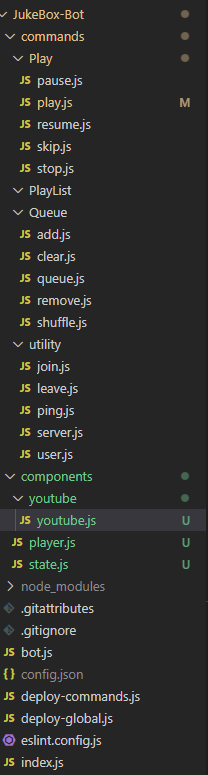
JukeBox-Bot/
├─ commands/                # 슬래시 명령어 모듈 (discord.js 가이드 권장 구조)
│  ├─ utility/              # 전체 서버 공용 유틸 명령어
│  │  ├─ ping.js
│  │  ├─ user.js
│  │  └─ server.js
│  └─ play/                 # 주크박스 제어 명령어
│     ├─ play.js            # 재생(검색어/URL)
│     ├─ skip.js            # 현재 곡 스킵
│     └─ stop.js            # 중지 및 연결 종료
│
├─ components/              # 외부 서비스/도메인 로직
│  ├─ youtube/
│  │  └─ youtube.js			# 유튜브 검색 & 연동기
│  ├──── player.js          # 미디어 플레이어
│  └──── state.js           # 길드별(서버별) 재생 상태 저장 Map
│
├─ bot.js                   # 클라이언트 생성, 커맨드 로딩, 이벤트 바인딩
├─ deploy-commands.js       # 슬래시 명령어 배포 스크립트
├─ index.js                 # 엔트리 포인트(= bot.js 로 위임)
├─ package.json
└─ config.json              # (로컬 전용) token, clientId, guildId  ※ 절대 공개 금지
봇에게 권한 부여하기
봇이 음성채팅에 진입하도록 할수 있도록 다음 패키지를 설정한다.
yarn add @discordjs/voice@0.17.0 play-dl
bot.js 수정
const client = new Client({ intents: [GatewayIntentBits.Guilds
                        		, GatewayIntentBits.GuildVoiceStates]});
권한 수정이 조금 필요하다
기존 앱의 권한을 다시 적용하기 위해 리디렉션 링크에 기존 링크를 추가한다.

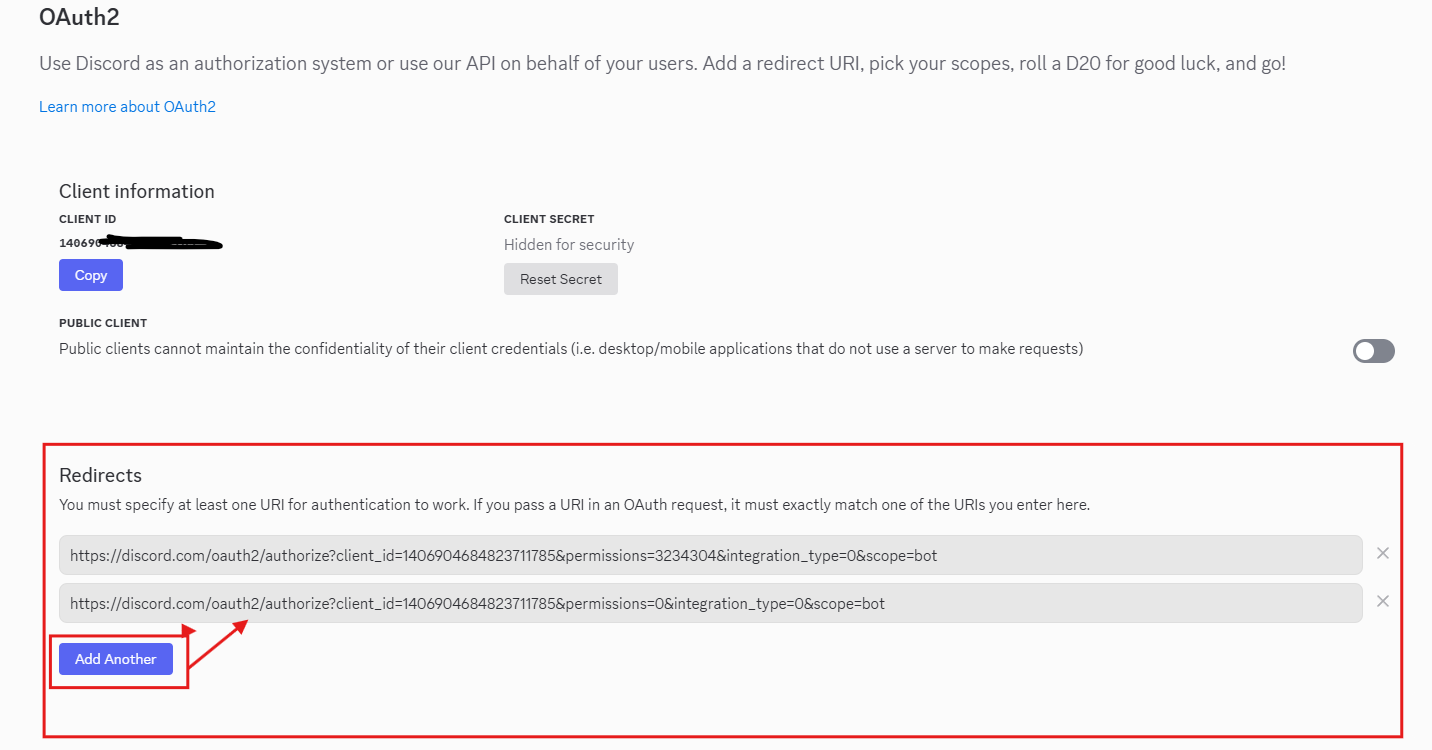
그리고 새로 설정되는 권한을 추가해준다.

대충 이렇게 해주고 리디렉션 해주면 된다.
그리고 URL을 다시 웹 브라우저에 검색하면
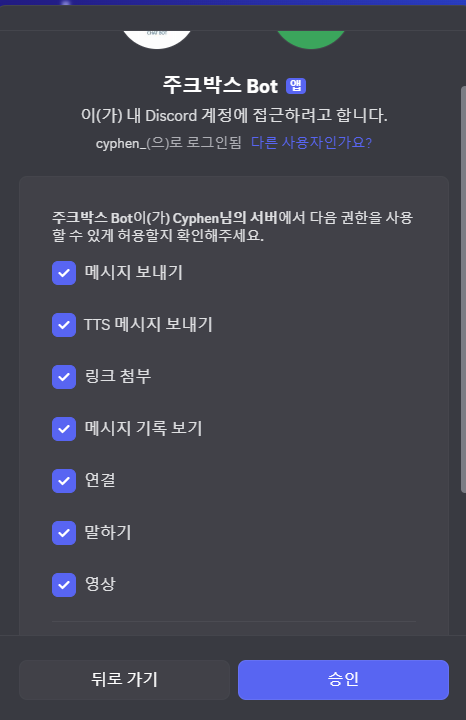
이렇게 새로운권한을 갖는 형태로 다시 초대 할 수 있다.
근데 리디렉션 되서 자동으로 추가 되니 별로 신경안써도 된다.
그리고 다른 채널을 파서 다시 초대해본다.
기존에는 명령어 배포가 한개의 서버에만 지정했기 때문에 즉시 반영되었다.
새 채널을 config.json에 추가하던지 아니면 global 배포용 스크립트를 만들어서 기존 명령어 배포기는 테스트용으로 사용하면 된다.
나는 글로벌 배포 스크립트를 하나 만들었다.
deploy-global.js
기존과 다른 점은 디스코드 서버에 요청하기 때문에 배포 지연이 있을 수 있다는 것이다.
const { REST, Routes } = require('discord.js');
const { clientId, token } = require('./config.json');
const fs = require('node:fs');
const path = require('node:path');

const commands = [];

// commands/<folder>/*.js 구조 순회
const foldersPath = path.join(__dirname, 'commands');
const commandFolders = fs.readdirSync(foldersPath);

for (const folder of commandFolders) {
  const commandsPath = path.join(foldersPath, folder);
  const commandFiles = fs.readdirSync(commandsPath).filter(file => file.endsWith('.js'));

  for (const file of commandFiles) {
    const filePath = path.join(commandsPath, file);
    const command = require(filePath);
    if ('data' in command && 'execute' in command) {
      commands.push(command.data.toJSON());
    } else {
      console.log(`[WARNING] The command at ${filePath} is missing "data" or "execute".`);
    }
  }
}

const rest = new REST().setToken(token);

(async () => {
  try {
    console.log(`Started refreshing (GLOBAL) ${commands.length} application (/) commands.`);

    // 글로벌 배포: 봇이 초대된 모든 서버에 공통 반영 (전파 지연 가능)
    const data = await rest.put(
      Routes.applicationCommands(clientId),
      { body: commands },
    );

    console.log(`Successfully reloaded (GLOBAL) ${data.length} application (/) commands.`);
    console.log('※ 글로벌 반영은 최대 1시간 지연될 수 있습니다.');
  } catch (error) {
    console.error('Global deploy failed:', error);
  }
})();
youtube 검색을 위한 라이브러리를 설치한다.
yarn add play-dl여러가지 음원 파일을 검색 & 재생하기 위한 라이브러리다.
spotify와 같은 것도 지원하긴 하는데 나중에 필요하면 써봐라
우선 유튜브 링크 모듈을 따로 분리한다.
youtube/youtube.js
// components/youtube/youtube.js
// 입력(검색어/URL) -> 단일 유튜브 영상 { url, title, videoId }로 표준화
// 정책: URL 판별/ID 추출은 직접 처리, 메타 조회/검색은 play-dl만 사용(재생은 별도 파이프)

const playdl = require('play-dl');
const { URL } = require('node:url');

/**
 * 문자열이 URL이면 URL 객체 반환, 아니면 null
 */
function toUrl(u)
{
    try
    {
        return new URL(u);
    }
    catch (e)
    {
        return null;
    }
}

/**
 * 유튜브 호스트 판정
 */
function isYouTubeHost(host)
{
    if (!host)
    {
        return false;
    }

    const h = host.toLowerCase();

    if (h === 'youtube.com')
    {
        return true;
    }
    else if (h === 'www.youtube.com')
    {
        return true;
    }
    else if (h === 'm.youtube.com')
    {
        return true;
    }
    else if (h === 'music.youtube.com')
    {
        return true;
    }
    else if (h === 'youtu.be')
    {
        return true;
    }
    else
    {
        return false;
    }
}

/**
 * 유튜브 URL에서 videoId / playlistId 추출
 */
function parseYouTubeIds(u)
{
    const url = toUrl(u);

    if (url === null)
    {
        return { videoId: null, playlistId: null };
    }

    if (!isYouTubeHost(url.hostname))
    {
        return { videoId: null, playlistId: null };
    }

    const host = url.hostname.toLowerCase();
    const path = url.pathname;
    const params = url.searchParams;

    if (host === 'youtu.be')
    {
        const segs = path.split('/').filter(Boolean);
        const id = segs.length >= 1 ? segs[0] : null;
        return { videoId: id, playlistId: params.get('list') };
    }
    else if (path === '/watch')
    {
        return { videoId: params.get('v'), playlistId: params.get('list') };
    }
    else if (path.startsWith('/shorts/'))
    {
        const segs = path.split('/').filter(Boolean);
        const id = segs.length >= 2 ? segs[1] : null;
        return { videoId: id, playlistId: params.get('list') };
    }
    else if (path.startsWith('/embed/'))
    {
        const segs = path.split('/').filter(Boolean);
        const id = segs.length >= 2 ? segs[1] : null;
        return { videoId: id, playlistId: params.get('list') };
    }
    else if (path.startsWith('/live/'))
    {
        const segs = path.split('/').filter(Boolean);
        const id = segs.length >= 2 ? segs[1] : null;
        return { videoId: id, playlistId: params.get('list') };
    }
    else if (host === 'music.youtube.com' && path === '/watch')
    {
        return { videoId: params.get('v'), playlistId: params.get('list') };
    }
    else
    {
        const listOnly = params.get('list');

        if (listOnly !== null)
        {
            return { videoId: null, playlistId: listOnly };
        }
        else
        {
            return { videoId: null, playlistId: null };
        }
    }
}

/**
 * videoId -> 표준 watch URL
 */
function toWatchUrl(videoId)
{
    return `https://www.youtube.com/watch?v=${videoId}`;
}

/**
 * 단일 영상 메타 조회 (play-dl 사용)
 */
async function fetchVideoMetaById(videoId)
{
    if (!videoId)
    {
        throw new Error('INVALID_VIDEO_ID');
    }

    const info = await playdl.video_info(toWatchUrl(videoId));
    const v = info !== null ? info.video_details : null;

    if (!v)
    {
        throw new Error('VIDEO_INFO_FAILED');
    }

    return { url: v.url, title: v.title, videoId: v.id || videoId };
}

/**
 * 검색어로 1건 조회 (play-dl 검색)
 */
async function searchOne(query)
{
    const results = await playdl.search(query, { source: { youtube: 'video' }, limit: 1 });

    if (!Array.isArray(results) || results.length === 0)
    {
        throw new Error('NO_RESULTS');
    }

    const r = results[0];
    const url = typeof r.url === 'string' ? r.url : '';
    const title = typeof r.title === 'string' && r.title.length > 0 ? r.title : url;
    const { videoId } = parseYouTubeIds(url);

    return { url: url, title: title, videoId: videoId || r.id || null };
}

/**
 * 입력(검색어/URL) → 단일 영상 해석
 */
async function resolveVideo(input, opts)
{
    const options = opts || {};
    const allowPlaylist = options.allowPlaylist === true;

    const url = toUrl(input);

    if (url !== null && isYouTubeHost(url.hostname))
    {
        const { videoId, playlistId } = parseYouTubeIds(input);

        if (videoId === null && playlistId !== null)
        {
            if (!allowPlaylist)
            {
                const err = new Error('PLAYLIST_URL_NOT_ALLOWED');
                err.code = 'PLAYLIST_URL_NOT_ALLOWED';
                err.playlistId = playlistId;
                throw err;
            }
            else
            {
                const err2 = new Error('PLAYLIST_HANDLING_NOT_IMPLEMENTED');
                err2.code = 'PLAYLIST_HANDLING_NOT_IMPLEMENTED';
                err2.playlistId = playlistId;
                throw err2;
            }
        }

        if (videoId !== null)
        {
            return await fetchVideoMetaById(videoId);
        }
        else
        {
            const bySearch = await searchOne(input);

            if (bySearch.videoId === null)
            {
                throw new Error('VIDEO_ID_NOT_FOUND');
            }
            return bySearch;
        }
    }
    else
    {
        const bySearch = await searchOne(input);

        if (bySearch.videoId === null)
        {
            throw new Error('VIDEO_ID_NOT_FOUND');
        }
        return bySearch;
    }
}

module.exports =
{
    resolveVideo,
    _internals:
    {
        toUrl,
        isYouTubeHost,
        parseYouTubeIds,
        fetchVideoMetaById,
        searchOne,
        toWatchUrl
    }
};
제대로 지원되는지 테스트 해보자면 다음과 같다.
Utility/test.js
const { SlashCommandBuilder } = require('discord.js');
const { runTest } = require('../../components/test');

module.exports =
{
    data: new SlashCommandBuilder()
        .setName('test')
        .setDescription('검색/URL 해석 테스트 (미입력 시 기본값: antifreeze, 지정 URL)')
        .addStringOption((o) =>
        {
            return o
                .setName('text')
                .setDescription('검색어 (미입력 시 antifreeze)');
        })
        .addStringOption((o) =>
        {
            return o
                .setName('url')
                .setDescription('유튜브 URL (미입력 시 기본 테스트 URL)');
        }),
    async execute(interaction)
    {
        const textInput = interaction.options.getString('text') || '';
        const urlInput = interaction.options.getString('url') || '';

        await interaction.deferReply({ ephemeral: true });

        const ctx =
        {
            user:
            {
                id: interaction.user.id,
                tag: interaction.user.tag
            },
            guild: interaction.guild
                ? { id: interaction.guild.id, name: interaction.guild.name }
                : null
        };

        const out = await runTest(textInput, urlInput, ctx);

        const lines = [];

        lines.push('🧪 **Test 결과**');
        lines.push('');
        lines.push(`입력(TEXT): ${out.inputs.text}`);
        lines.push(`입력(URL) : ${out.inputs.url}`);
        lines.push('');

        lines.push('**[TEXT]**');
        if (out.text.ok)
        {
            lines.push(`• title: ${out.text.result.title}`);
            lines.push(`• videoId: ${out.text.result.videoId}`);
            lines.push(`• url: ${out.text.result.url}`);
        }
        else
        {
            lines.push(`• 실패: ${out.text.error.code} - ${out.text.error.message}`);
        }

        lines.push('');
        lines.push('**[URL]**');
        if (out.url.ok)
        {
            lines.push(`• title: ${out.url.result.title}`);
            lines.push(`• videoId: ${out.url.result.videoId}`);
            lines.push(`• url: ${out.url.result.url}`);
        }
        else
        {
            lines.push(`• 실패: ${out.url.error.code} - ${out.url.error.message}`);
        }

        await interaction.editReply(lines.join('\n'));
    }
};
components/test.js
const { resolveVideo } = require('../components/youtube/youtube.js');

async function runTest(textInput, urlInput, ctx)
{
    const defaultText = 'antifreeze';
    const defaultUrl = 'https://www.youtube.com/watch?v=gGfFoIDXnS8&list=RD74_yqNBhQbA&index=2';

    const text = typeof textInput === 'string' && textInput.length > 0 ? textInput : defaultText;
    const url = typeof urlInput === 'string' && urlInput.length > 0 ? urlInput : defaultUrl;

    const stamp = new Date().toISOString();

    console.log('========================================');
    console.log('[TEST] TIMESTAMP:', stamp);

    if (ctx && ctx.user)
    {
        console.log('[TEST] USER:', `${ctx.user.tag} (${ctx.user.id})`);
    }

    if (ctx && ctx.guild)
    {
        console.log('[TEST] GUILD:', `${ctx.guild.name} (${ctx.guild.id})`);
    }

    console.log('[TEST] TEXT_INPUT:', text);
    console.log('[TEST] URL_INPUT :', url);

    // TEXT
    let textResult = null;
    let textError = null;

    try
    {
        textResult = await resolveVideo(text);
        console.log('[TEST] TEXT_RESOLVED:', textResult);
    }
    catch (e)
    {
        textError = { code: e?.code || 'UNKNOWN', message: e?.message || String(e) };
        console.error('[TEST] TEXT_ERROR:', textError);
    }

    // URL
    let urlResult = null;
    let urlError = null;

    try
    {
        urlResult = await resolveVideo(url);
        console.log('[TEST] URL_RESOLVED:', urlResult);
    }
    catch (e)
    {
        urlError = { code: e?.code || 'UNKNOWN', message: e?.message || String(e) };
        console.error('[TEST] URL_ERROR:', urlError);
    }

    return {
        inputs:
        {
            text,
            url
        },
        text:
        {
            ok: textResult !== null,
            result: textResult,
            error: textError
        },
        url:
        {
            ok: urlResult !== null,
            result: urlResult,
            error: urlError
        }
    };
}

module.exports =
{
    runTest
};
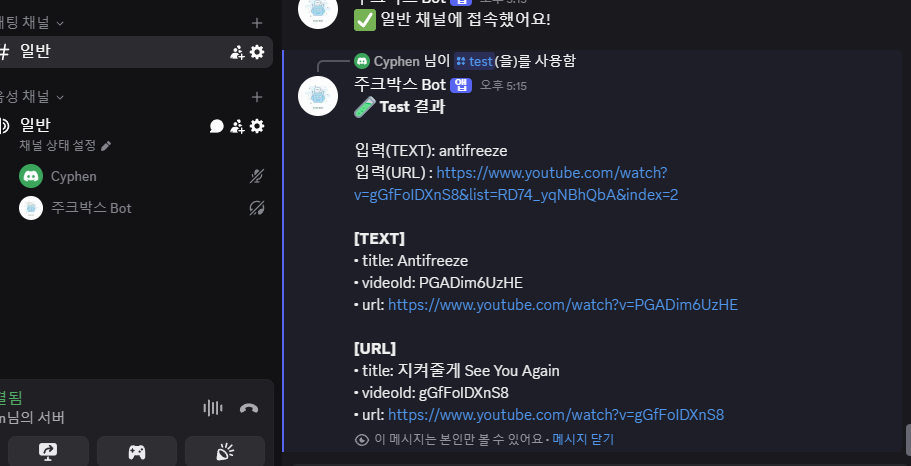
명령어 배포하고 /test를 통해 입력하면 다음과 같이 콘솔창과 디스코드 메세지를 통해 반응한다.
✅ Ready! Logged in as 주크박스 Bot#4534
(node:1388) Warning: Supplying "ephemeral" for interaction response options is deprecated. Utilize flags instead.
(Use `node --trace-warnings ...` to show where the warning was created)
========================================
[TEST] TIMESTAMP: 2025-08-21T08:15:30.384Z
[TEST] USER: cyphen_ (303083261574250497)
[TEST] GUILD: Cyphen님의 서버 (1243538997939011625)
[TEST] TEXT_INPUT: antifreeze
[TEST] URL_INPUT : https://www.youtube.com/watch?v=gGfFoIDXnS8&list=RD74_yqNBhQbA&index=2
[TEST] TEXT_RESOLVED: {
  url: 'https://www.youtube.com/watch?v=PGADim6UzHE',
  title: 'Antifreeze',
  videoId: 'PGADim6UzHE'
}
[TEST] URL_RESOLVED: {
  url: 'https://www.youtube.com/watch?v=gGfFoIDXnS8',
  title: '지켜줄게 See You Again',
  videoId: 'gGfFoIDXnS8'
}
이제 URL을 받아왔으니 큐에 넣는 작업을 진행해야 한다.
우선 길드별 Player 상태 관리를 위해 state.js를 변경한다.
components/state.js
// components/state.js
const Status =
{
    IDLE: 'IDLE',
    BUFFERING: 'BUFFERING',
    PLAYING: 'PLAYING',
    PAUSED: 'PAUSED',
    STOPPED: 'STOPPED',
    ERROR: 'ERROR'
};

const Event =
{
    LOAD: 'LOAD',
    START: 'START',
    PAUSE: 'PAUSE',
    RESUME: 'RESUME',
    END: 'END',
    STOP: 'STOP',
    FAIL: 'FAIL',
    RESET: 'RESET'
};

const TRANSITIONS =
{
    [Status.IDLE]: { [Event.LOAD]: Status.BUFFERING },
    [Status.BUFFERING]: { [Event.START]: Status.PLAYING, [Event.FAIL]: Status.ERROR, [Event.STOP]: Status.STOPPED },
    [Status.PLAYING]: { [Event.PAUSE]: Status.PAUSED, [Event.END]: Status.IDLE, [Event.STOP]: Status.STOPPED, [Event.FAIL]: Status.ERROR },
    [Status.PAUSED]: { [Event.RESUME]: Status.PLAYING, [Event.STOP]: Status.STOPPED },
    [Status.STOPPED]: { [Event.LOAD]: Status.BUFFERING, [Event.RESET]: Status.IDLE },
    [Status.ERROR]: { [Event.RESET]: Status.IDLE }
};

class PlayerFSM
{
    constructor()
    {
        this.current = Status.IDLE;
        this.updatedAt = Date.now();
    }

    apply(event)
    {
        const next = TRANSITIONS[this.current]?.[event];
        if (next)
        {
            this.current = next;
            this.updatedAt = Date.now();
            return true;
        }
        return false;
    }
}

const STATES = new Map();

function get(gid)
{
    if (!STATES.has(gid))
    {
        STATES.set(gid, new PlayerFSM());
    }
    return STATES.get(gid);
}

function snapshot(gid)
{
    const s = get(gid);
    return { status: s.current, updatedAt: s.updatedAt };
}

module.exports = { Status, Event, get, snapshot };
그리고 현재 재생되고 있는 Player의 큐 목록을 관리할 queue.js를 추가한다.
components/queue.js
// components/queue.js
const QUEUES = new Map(); // guildId -> [ { url, title, requestedBy } ]

/**
 * command - queue
 * @param {*} gid
 * @returns
 */
function get(gid)
{
    if (!QUEUES.has(gid))
    {
        QUEUES.set(gid, []);
    }
    return QUEUES.get(gid);
}

/**
 * command - add
 * @param {*} gid
 * @param {*} track
 */
function push(gid, track)
{
    get(gid).push(track);
}

function getNext(gid)
{
    return get(gid).shift() || null;
}
// queue-clear
function clear(gid)
{
    get(gid).length = 0;
}

// queue-show
function snapshot(gid)
{
    return [...get(gid)];
}

// queue-remove (index or tail)
function remove(gid, index = null)
{
    const q = get(gid);
    if (q.length === 0)
    {
        return null;
    }

    if (index === null || index >= q.length)
    {
        return q.pop();
    }
    return q.splice(index, 1)[0];
}

// queue-shuffle
function shuffle(gid)
{
    const q = get(gid);
    for (let i = q.length - 1; i > 0; i--)
    {
        const j = Math.floor(Math.random() * (i + 1));
        [q[i], q[j]] = [q[j], q[i]];
    }
    return q;
}

module.exports = { get, getNext, push, clear, snapshot, remove, shuffle };
그리고 오디오를 실제로 재생하고 멈추는 등의 재생을 담당하는 player.js를 작성한다.
components/Player.js
// components/player.js
const {
    createAudioPlayer, createAudioResource,
    NoSubscriberBehavior, AudioPlayerStatus,
    getVoiceConnection, VoiceConnectionStatus, entersState, StreamType
} = require('@discordjs/voice');

const { spawn } = require('child_process');
const Queue = require('./queue');
const State = require('./state');

const PLAYERS = new Map();

function ensurePlayer(gid)
{
    if (PLAYERS.has(gid))
    {
        return PLAYERS.get(gid);
    }

    const player = createAudioPlayer({
        behaviors: { noSubscriber: NoSubscriberBehavior.Pause }
    });

    player.on(AudioPlayerStatus.Idle, () =>
    {
        State.get(gid).apply(State.Event.END);
        void playNext(gid);
    });

    player.on('error', (err) =>
    {
        console.error(`[player ${gid}] error:`, err);
        State.get(gid).apply(State.Event.FAIL);
    });

    PLAYERS.set(gid, player);
    return player;
}

function makeFfmpegStream(url)
{
    const ytdlp = spawn('yt-dlp', ['-f', 'bestaudio/best', '-o', '-', '--quiet'], { stdio: ['ignore', 'pipe', 'pipe'] });
    const ffmpeg = spawn('ffmpeg',
        ['-loglevel', 'error', '-i', 'pipe:0', '-f', 's16le', '-ar', '48000', '-ac', '2', 'pipe:1'],
        { stdio: ['pipe', 'pipe', 'pipe'] });
    ytdlp.stdout.pipe(ffmpeg.stdin);
    return ffmpeg;
}

// player-play (큐에서 곡 꺼내 실행)
async function playNext(gid)
{
    const track = Queue.getNext(gid);
    if (!track)
    {
        State.get(gid).apply(State.Event.END);
        return null;
    }

    const conn = getVoiceConnection(gid);
    if (!conn)
    {
        throw new Error('VOICE_NOT_CONNECTED');
    }

    await entersState(conn, VoiceConnectionStatus.Ready, 15_000);

    State.get(gid).apply(State.Event.LOAD);

    const player = ensurePlayer(gid);
    const ffmpeg = makeFfmpegStream(track.url);

    const resource = createAudioResource(ffmpeg.stdout, { inputType: StreamType.Arbitrary });

    conn.subscribe(player);
    player.play(resource);

    State.get(gid).apply(State.Event.START);
    return track;
}

// player-pause
function pause(gid)
{
    const player = PLAYERS.get(gid);
    if (player?.pause())
    {
        State.get(gid).apply(State.Event.PAUSE);
    }
}

// player-resume
function resume(gid)
{
    const player = PLAYERS.get(gid);
    if (player?.unpause())
    {
        State.get(gid).apply(State.Event.RESUME);
    }
}

// player-skip
function skip(gid)
{
    const player = PLAYERS.get(gid);
    if (player)
    {
        player.stop(true);
        State.get(gid).apply(State.Event.STOP);
    }
}

// player-stop
function stop(gid)
{
    const player = PLAYERS.get(gid);
    if (player)
    {
        player.stop(true);
    }
    Queue.clear(gid);
    State.get(gid).apply(State.Event.STOP);
}

module.exports = { playNext, pause, resume, skip, stop };
마지막으로 루트 디렉토리에 명령어를 해석하고 처리할 외부 wrapper인 jukebox를 하나 만들어서 중재자로 둔다.
앞으로 모든 명령어는 이 중재자를 통해 처리된다.
jukebox.js
// components/jukebox.js
const Queue = require('./components/queue');
const Player = require('./components/player');
const State = require('./components/state');
const { resolveVideo } = require('./components/youtube/youtube');

async function play(gid, input, requestedBy)
{
    const meta = await resolveVideo(input);

    Queue.push(gid, {
        url: meta.url,
        title: meta.title,
        requestedBy
    });

    if (State.snapshot(gid).status === State.Status.IDLE)
    {
        await Player.playNext(gid);
    }

    return meta;
}

function pause(gid)
{
    Player.pause(gid);
}

function resume(gid)
{
    Player.resume(gid);
}

function skip(gid)
{
    Player.skip(gid);
}

function stop(gid)
{
    Player.stop(gid);
}

function queue(gid)
{
    return Queue.snapshot(gid);
}

function clear(gid)
{
    Queue.clear(gid);
}

function remove(gid, index)
{
    return Queue.remove(gid, index);
}

function shuffle(gid)
{
    return Queue.shuffle(gid);
}

function status(gid)
{
    return State.snapshot(gid);
}

module.exports = {
    play,
    pause,
    resume,
    skip,
    stop,
    queue,
    clear,
    remove,
    shuffle,
    status
};
Commands
사실 명령어 세트는 커맨드 패턴으로 만드는게 좋긴 한데...귀찮다 그냥 심플 프로젝트니까 간단한 작성으로 호출만 하도록 하자.
이거 하려면 Ts로 프로젝트 바꾸거나 클래스 구성해서 스트링 파서 만들어야 되서 귀찮다...
그냥 커맨드를 UI 입력버튼이라 가정하고 MVC로 구성하는게 제일 간단하다.
Commands/play/play.js
// commands/Play/play.js
const { SlashCommandBuilder } = require('discord.js');
const Jukebox = require('../../jukebox');

module.exports =
{
    data: new SlashCommandBuilder()
        .setName('play')
        .setDescription('노래 재생 (검색어/URL)')
        .addStringOption(opt =>
            opt.setName('query')
               .setDescription('검색어 또는 URL')
               .setRequired(true)
        ),

    async execute(interaction)
    {
        const gid = interaction.guildId;
        const query = interaction.options.getString('query');
        const requestedBy = interaction.user.tag;

        await interaction.deferReply();

        try
        {
            const meta = await Jukebox.play(gid, query, requestedBy);
            await interaction.editReply(`▶️ **${meta.title}** (by ${requestedBy}) 추가됨`);
        }
        catch (err)
        {
            console.error('[play]', err);
            await interaction.editReply('❌ 재생 실패: ' + (err.message || err));
        }
    }
};
Commands/queue/queue.js
// commands/Queue/queue.js
const { SlashCommandBuilder } = require('discord.js');
const Jukebox = require('../../jukebox');

module.exports =
{
    data: new SlashCommandBuilder()
        .setName('queue')
        .setDescription('현재 대기열 확인'),
    async execute(interaction)
    {
        const q = Jukebox.queue(interaction.guildId);

        if (q.length === 0)
        {
            await interaction.reply('📭 대기열이 비어있습니다.');
            return;
        }

        const lines = q.map((t, i) => `${i + 1}. ${t.title} (by ${t.requestedBy})`);
        await interaction.reply('🎶 현재 대기열:\n' + lines.join('\n'));
    }
};
현재는 주크박스에서 PlayNext를 지원하지 못하고 있다.
왜냐하면 실제 유튜브 링크를 통해 영상을 재생하려면 yt-dlp와 같은 외부 라이브러리를 사용하거나 play-dl의 play기능을 사용해야 하는데 아직 버그수정을 못했기 때문이다.
그래서 jukebox.js에서 play함수에서 player.playnext함수를 주석처리하고 테스트하면 다음과 같이 실행된다.]
jukebox.js
async function play(gid, input, requestedBy)
{
    const meta = await resolveVideo(input);

    Queue.push(gid, {
        url: meta.url,
        title: meta.title,
        requestedBy
    });

    if (State.snapshot(gid).status === State.Status.IDLE)
    {
        // await Player.playNext(gid);
    }

    return meta;
}
다음엔 유튜브 음원 재생기능을 실제로 작동하도록 바꿔보겠다.
프로젝트 코드는 다음 레포지토리를 통해 제공됩니다.
cyphen156/JukeBox-Bot: ToyProject : Discord JukeBox-Bot
GitHub - cyphen156/JukeBox-Bot: ToyProject : Discord JukeBox-Bot
ToyProject : Discord JukeBox-Bot. Contribute to cyphen156/JukeBox-Bot development by creating an account on GitHub.
github.com
'토이프로젝트 > 디스코드 주크박스 봇' 카테고리의 다른 글
| 디스코드 봇 - 주크박스 봇 만들기 #6 플레이리스트 저장 && 암호화 (3) | 2025.08.29 |
|---|---|
| 디스코드 봇 - 주크박스 봇 만들기 #5 복호화 → 암호화 재생 → 스트림 안정화 (6) | 2025.08.22 |
| 디스코드 봇 - 주크박스 만들기 #3 명령어 배포하기 (1) | 2025.08.19 |
| 디스코드 봇 - 주크박스 만들기 #2 봇 활성화 및 코드 적용하기 (8) | 2025.08.18 |
| 디스코드 봇 - 주크박스 만들기 #1 봇 생성하기 (2) | 2025.08.18 |


