
- 분류 전체보기 (484)

| 일 | 월 | 화 | 수 | 목 | 금 | 토 |
|---|---|---|---|---|---|---|
| 1 | 2 | 3 | 4 | 5 | 6 | 7 |
| 8 | 9 | 10 | 11 | 12 | 13 | 14 |
| 15 | 16 | 17 | 18 | 19 | 20 | 21 |
| 22 | 23 | 24 | 25 | 26 | 27 | 28 |
- 잡생각 정리글
- 데이터 통신과 컴퓨터 네트워크
- 게임 수학
- 밑바닥부터 만드는 컴퓨팅 시스템 2판
- 김진홍 옮김
- C++
- C
- 생능출판
- 주우석
- 일기
- https://insightbook.co.kr/
- HANBIT Academy
- 메타버스
- 이득우
- (주)책만
- Shimon Schocken
- booksr.co.kr
- unity6
- BOJ
- Noam Nisan
- 이득우의 게임수학
- JavaScript
- hanbit.co.kr
- 입출력과 사칙연산
- 박기현
- 전공자를 위한 C언어 프로그래밍
- 백준
- 알고리즘
- The Elements of Computing Systems 2/E
- C#
- Today
- Total
cyphen156
디스코드 봇 - 주크박스 봇 만들기 #6 플레이리스트 저장 && 암호화 본문
공부하긴 싫고 프로젝트도 조그맣게 하고싶어서 하는 프로젝트
이번 글은 공식 문서를 참고하여 작성됩니다.
이번 글에서 지원할 기능은 다음과 같다.
- 봇 설명서 (help Command)
- playList 조작(playlist + subCommand)
- 플레이 리스트 암호화 저장
- 수정 권한 통제
- 조회는 누구나 가능하게 오픈
- 서버에 봇 혼자 남아 프로세스 계속 사용되는것 방지하기(봇 오토 로그아웃)
어째 규모가 점점 커질것 같아서 딱 오늘까지만 하고 마무리 하려고 한다.
암호화도 들어갈 예정이라 바이브코딩이 좀 많아질 것 같다.
코드 길이가 길어질 예정으로 접은글로 제공한다.
※ 필수 수정 요소
.gitignore
node_modules

config.json

.env

/storage/data/
프로젝트 구조
JukeBox-Bot/
├─ commands/                        # 슬래시 커맨드 정의(입력 파싱 전담)
│  ├─ utility/ (help, join, leave, ping, test, user, server)
│  ├─ player/  (play, pause, resume, skip, stop)
│  ├─ queue/   (add, clear, queue, remove, shuffle)
│  └─ playlist/
│     └─ playlist.js               # show/info/create/delete 등 서브커맨드 허브
│
├─ components/                     # 런타임 구성요소(실행·상태·플레이어)
│  ├─ youtube/ (youtube.js)        # 검색·URL 해석
│  ├─ player.js                    # 길드별 AudioPlayer 런타임
│  ├─ queue.js                     # 길드별 대기열
│  ├─ state.js                     # 길드별 FSM
│  └─ test.js
│
├─ services/                       # 비즈니스 로직(권한/검증/정책/트랜잭션)
│  └─ playlistService.js           # 플레이리스트 CRUD, 트랙 add/remove 등
│
├─ storage/                        # 데이터 베이스
│  ├─ storage.js              	   # 읽기/쓰기 + 암/복호화 + 락
│  ├─ crypto.js                    # 암호화 엔진 (AES-GCM 기본, 3DES 옵션)
│  ├─ schema/
│  │  ├─ document.js          	   # 문서(JSON) 스키마 검증·정규화·마이그레이션
│  │  └─ filesystem.js             # 파일 스키마 검증 + JSON 스펙 → 실제 파일 생성기
│  └─ data/
│     └─ {guildId}/
│        ├─ {userId}/
│        │  └─ playlist.json.enc
│        └─ logs/{YYYY-MM-DD}.log
│        └─ catalog.json	   # 플레이리스트 조회용 서버별 카탈로그
│
├─ utility/                        # 공통 유틸
│  ├─ mutex.js                     # 파일 단위 직렬화(동시 접근 방지)
│  ├─ logger.js                    # 로깅 어댑터
│  └─ time.js			   # KST 래핑 모듈
│
├─ jukebox.js                      # 퍼사드(components 통합 단일 API)
├─ bot.js                          # 클라이언트·이벤트 바인딩
├─ deploy-commands.js
├─ deploy-global.js
├─ index.js                        # 엔트리
├─ .env                            # MASTER_KEY, KEY_VERSION 등(운영)
├─ config.json                     # 로컬 개발용 (token 등 + 개발용 MASTER_KEY)
├─ .gitignore
└─ package.json
Commands/utility/help.js(JukeBox-Bot 설명서)
명령어가 적당히 많아졌으니 이제 드롭다운 메뉴를 통해 명령어를 간단하게 시각화 해줄 수 있도록 지원하는 명령어를 하나 제공해주기로 결정했다.
// commands/help.js
const
{
  SlashCommandBuilder,
  ActionRowBuilder,
  StringSelectMenuBuilder,
  StringSelectMenuOptionBuilder,
  ComponentType,
  MessageFlags,
} = require('discord.js');

const TEXT =
{
  jukebox:
`📀 주크박스 봇 관련 명령어
/join   : 음성 채널에 입장
/leave  : 음성 채널에서 퇴장
/help   : 도움말 표시`,

  playback:
`🎶 음악 재생 명령어
/play    : 음악 재생
/pause   : 일시 정지
/stop    : 정지
/resume  : 이어서 재생
/skip    : 다음 곡으로`,

  queue:
`📋 큐 관련 명령어
/add     : 큐에 추가
/clear   : 큐 초기화
/queue   : 현재 큐 보기
/remove  : 특정 곡 제거
/show    : 큐 상세 보기
/shuffle : 큐 셔플`,

  playlist:
`📂 플레이리스트 관련 명령어
/playlist show    : 플레이리스트 보기
/playlist info    : 특정 플레이리스트 상세 보기
/playlist create  : 플레이리스트 생성
/playlist delete  : 플레이리스트 삭제
/playlist add     : 플레이리스트에 곡 추가
/playlist remove  : 플레이리스트에서 곡 제거
/playlist clear   : 플레이리스트 비우기
/playlist queue   : 플레이리스트 큐에 추가하기`,
};

function render(category)
{
  const header = '🎵 **JukeBox-Bot 사용 가이드**\n원하는 카테고리를 선택하세요.\n';
  const body = TEXT[category] ?? TEXT.jukebox;
  return `${header}\n\`\`\`\n${body}\n\`\`\``;
}

function buildRow(active)
{
  return new ActionRowBuilder()
    .addComponents(
      new StringSelectMenuBuilder()
        .setCustomId('help:select')
        .setPlaceholder('카테고리를 선택하세요')
        .addOptions(
          new StringSelectMenuOptionBuilder()
            .setLabel('주크박스 봇')
            .setDescription('입장/퇴장/도움말')
            .setValue('jukebox')
            .setDefault(active === 'jukebox'),

          new StringSelectMenuOptionBuilder()
            .setLabel('재생')
            .setDescription('재생/일시정지/정지/스킵')
            .setValue('playback')
            .setDefault(active === 'playback'),

          new StringSelectMenuOptionBuilder()
            .setLabel('큐')
            .setDescription('추가/삭제/셔플/큐 보기')
            .setValue('queue')
            .setDefault(active === 'queue'),

          new StringSelectMenuOptionBuilder()
            .setLabel('플레이리스트')
            .setDescription('show/info/create/delete/add/remove/clear')
            .setValue('playlist')
            .setDefault(active === 'playlist'),
        )
    );
}

module.exports =
{
  data: new SlashCommandBuilder()
    .setName('help')
    .setDescription('JukeBox-Bot 설명서'),

  async execute(interaction)
  {
    const userId = interaction.user.id;
    let active = 'jukebox';

    const msg = await interaction.reply(
    {
      content: render(active),
      components: [buildRow(active)],
      flags: MessageFlags.Ephemeral,
    });

    const filter = (i) =>
    {
      return i.isStringSelectMenu()
        && i.customId === 'help:select'
        && i.user.id === userId;
    };

    while (true)
    {
      try
      {
        const i = await msg.awaitMessageComponent(
        {
          componentType: ComponentType.StringSelect,
          filter,
          time: 60_000,
        });

        const next = i.values && i.values[0] ? i.values[0] : active;
        active = next;

        await i.update(
        {
          content: render(active),
          components: [buildRow(active)],
        });
      }
      catch
      {
        try
        {
          const row = buildRow(active);
          row.components[0].setDisabled(true);

          await interaction.editReply(
          {
            content: render(active) + '\n_세션이 만료되어 메뉴가 비활성화되었습니다._',
            components: [row],
          });
        }
        catch {}
        break;
      }
    }
  },
};
Components/Playlist/playlist.js
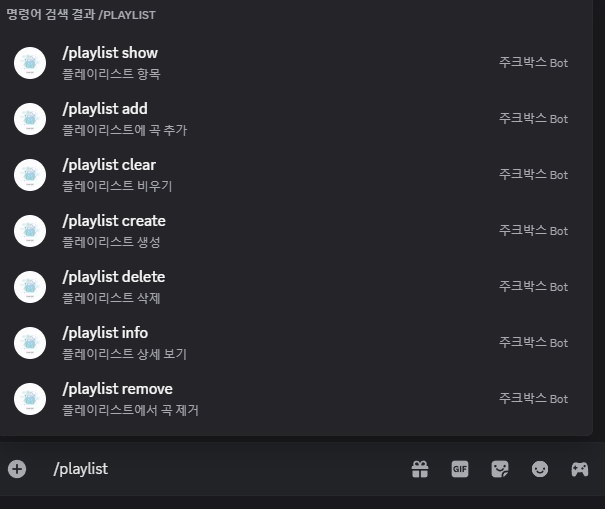
이번에 작성될 스크립트에서는 그냥 단일 파일로 작성하여 서브 커맨드를 통해 명령어를 다중지원한다.
파일별로 분할할까 생각도 했는데 그러면 Queue폴더쪽 파일과 이름이 겹쳐서 헷갈릴 수 있겟다 싶어서 그냥 단일 파일 분기로 제공하기로 결정했다.
const
{
    SlashCommandBuilder,
    MessageFlags,
} = require('discord.js');

const svc = require('../../services/playlistService');
const jukebox = require('../../jukebox');

async function reply(interaction, content)
{
    await interaction.reply({ content, flags: MessageFlags.Ephemeral });
}

function renderCatalogText(guildName, items) {
  if (!items.length) return `📂 ${guildName}의 플레이리스트: (없음)`;
  const byOwner = new Map();
  for (const { userId, playlistName } of items) {
    if (!byOwner.has(userId)) byOwner.set(userId, []);
    byOwner.get(userId).push(playlistName);
  }
  const lines = [`📂 ${guildName}의 플레이리스트 (${items.length}개)`];
  for (const uid of [...byOwner.keys()].sort()) {
    const names = byOwner.get(uid).sort();
    lines.push(`• <@${uid}> — ${names.length}개`);
    lines.push(`  - ${names.join('\n ')}`);
  }
  let text = lines.join('\n');
  if (text.length > 1900) text = text.slice(0, 1900) + '\n… (길이 제한으로 일부 생략)';
  return text;
}

module.exports =
{
    data: new SlashCommandBuilder()
        .setName('playlist')
        .setDescription('플레이리스트 관리')
        .addSubcommand(sc =>
            sc.setName('show').setDescription('플레이리스트 항목'))
        .addSubcommand(sc =>
            sc.setName('info')
              .setDescription('플레이리스트 상세 보기')
              .addStringOption(o => o.setName('name').setDescription('플레이리스트 이름').setRequired(true)))
        .addSubcommand(sc =>
            sc.setName('create')
              .setDescription('플레이리스트 생성')
              .addStringOption(o => o.setName('name').setDescription('플레이리스트 이름').setRequired(true)))
        .addSubcommand(sc =>
            sc.setName('delete')
              .setDescription('플레이리스트 삭제')
              .addStringOption(o => o.setName('name').setDescription('플레이리스트 이름').setRequired(true)))
        .addSubcommand(sc =>
            sc.setName('add')
              .setDescription('플레이리스트에 곡 추가')
              .addStringOption(o => o.setName('name').setDescription('플레이리스트 이름').setRequired(true))
              .addStringOption(o => o.setName('song').setDescription('검색어/URL/VideoId').setRequired(true))
              .addStringOption(o => o.setName('title').setDescription('표시할 제목(선택)').setRequired(false)))
        .addSubcommand(sc =>
            sc.setName('remove')
              .setDescription('플레이리스트에서 곡 제거')
              .addStringOption(o => o.setName('name').setDescription('플레이리스트 이름').setRequired(true))
              .addIntegerOption(o => o.setName('index').setDescription('1부터 (미입력 시 마지막)').setMinValue(1).setRequired(false)))
        .addSubcommand(sc =>
            sc.setName('clear')
              .setDescription('플레이리스트 비우기')
              .addStringOption(o => o.setName('name').setDescription('플레이리스트 이름').setRequired(true)))
        .addSubcommand(sc =>
            sc.setName('queue')
              .setDescription('플레이리스트 큐에 추가하기')
              .addStringOption(o => o.setName('playlist').setDescription('플레이리스트 이름').setRequired(true))),

    async execute(interaction)
    {
        const sub  = interaction.options.getSubcommand();
        const name = interaction.options.getString('name');
        const gid  = interaction.guildId;
        const uid  = interaction.user.id;

        try
        {
            switch (sub)
            {
                case 'show': {
                  const guildName = interaction.guild?.name || '이 서버';
                  const items = await svc.showPlayList(gid); // [{ userId, playlistName }, ...]
                  const text = renderCatalogText(guildName, items);
                  return reply(interaction, text);
                }

                case 'create':
                {
                    const ok = await svc.createPlayList(gid, uid, name);
                    return reply(interaction, ok ? `🆕 \`${name}\` 생성 완료`
                                                 : `⚠️ \`${name}\` 은(는) 이미 존재합니다.`);
                }

                case 'delete':
                {
                    const ok = await svc.deletePlayList(gid, uid, name);
                    return reply(interaction, ok ? `🗑️ \`${name}\` 삭제 완료`
                                                 : `⚠️ \`${name}\` 을(를) 찾을 수 없습니다.`);
                }

                case 'add':
                {
                    const input = interaction.options.getString('song');
                    const title = interaction.options.getString('title') || undefined;

                    const ok = await svc.addTrack(gid, uid, name, input, title);
                    return reply(interaction, ok ? `➕ \`${name}\`에 추가 완료`
                                                 : `⚠️ 추가 실패. \`${name}\` 또는 입력을 확인하세요.`);
                }

                case 'remove':
                {
                    const index = interaction.options.getInteger('index'); // 1-base or null
                    const ok = await svc.removeTrack(gid, uid, name, index ?? undefined);
                    return reply(interaction, ok
                        ? (index ? `➖ \`${name}\`에서 ${index}번 제거 완료` : `➖ \`${name}\`에서 **마지막 곡** 제거 완료`)
                        : `⚠️ 제거 실패. \`${name}\` 또는 인덱스를 확인하세요.`);
                }

                case 'clear':
                {
                    const ok = await svc.clearPlaylist(gid, uid, name);
                    return reply(interaction, ok ? `🧹 \`${name}\` 비우기 완료`
                                                 : `⚠️ \`${name}\` 을(를) 찾을 수 없습니다.`);
                }

                case 'info':
                {
                    const info = await svc.infoPlayList(gid, uid, name);
                    if (!info)
                    {
                        return reply(interaction, `⚠️ \`${name}\` 을(를) 찾을 수 없습니다.`);
                    }

                    const body = info.tracks.length
                        ? info.tracks.map((t, i) => `${i + 1}. ${t.title}`).join('\n')
                        : '(비어있음)';

                    return reply(interaction, `ℹ️ \`${name}\` 정보 (총 ${info.count}곡)\n\`\`\`\n${body}\n\`\`\``);
                }

                case 'queue':
                {
                    const playlistName = interaction.options.getString('playlist', true);
                    const gid = interaction.guildId;
                    const uid = interaction.user.id;
                    const requestedBy = interaction.user.tag;

                    await interaction.deferReply({ ephemeral: true });

                    const info = await svc.infoPlayList(gid, uid, playlistName);
                    if (!info)
                    {
                        return interaction.editReply(`⚠️ \`${playlistName}\` 을(를) 찾을 수 없습니다.`);
                    }
                    if (!Array.isArray(info.tracks) || info.tracks.length === 0)
                    {
                        return interaction.editReply(`📭 \`${playlistName}\` 은(는) 비어 있습니다.`);
                    }

                    try
                    {
                        const r = await jukebox.addPlaylist({ guildId: gid, tracks: info.tracks }, { requestedBy });

                        if (!r.ok)
                        {
                            return interaction.editReply('❌ 큐 추가 실패');
                        }

                        const suffix = r.preview?.length ? `\n추가된 곡: \n${r.preview.join('\n ')}` : '';
                        return interaction.editReply(
                            `▶️ \`${playlistName}\` 대기열에 ${r.added}곡 추가 완료`
                            + (r.failed ? ` (실패 ${r.failed}곡)` : '')
                            + suffix
                        );
                    }
                    catch (e)
                    {
                        console.error('[playlist/queue] add failed:', e);
                        return interaction.editReply('❌ 큐 추가 중 오류가 발생했습니다.');
                    }
                }
            }
        }
        catch (err)
        {
            console.error(`[playlist/${sub}]`, err);
            const msg = { content: '⚠️ 오류가 발생했습니다.', flags: MessageFlags.Ephemeral };
            return (interaction.deferred || interaction.replied) ? interaction.followUp(msg) : interaction.reply(msg);
        }
    },
};
이제 명령어를 만들었으니 실제로 서버에 데이터를 저장할 수 있도록 실행기를 만들어야 한다.
서버에 저장 & 조회 명령은 service 폴더를 통해 제공하기로 하고, 데이터 저장은 storage를 통해 제공하기로 한다.
우선 데이터 저장 경로부터 살펴보자
가장 큰 디렉토리는 역시 storage다.
모든 저장 파일이 여기에 저장될 예정이다.
다음으로는 길드별 단일 파일에서 플레이 리스트를 제공할지 아니면 storage의 하위 디렉토리로 길드별 디렉토리를 제공하여 그 안에서 유저별 파일을 통해 플레이리스트를 제공할 지를 결정해야한다.
나는 암호화를 고려하고 있으며, 같은 길드 내의 다른 유저의 플레이리스트를 수정할 수 없도록 하기 위해 길드별 디렉토리 & 유저별 Json파일을 통해 플레이리스트를 제공하도록 하겠다.
폴더 구조를 결정했다면 암호화를 제공하기 위한 환경변수와 utility를 먼저 제공한다.
.env
암호화를 위한 암호화 키는 SHA-256을 통해 AES 대칭 키를 만들어낸다.
간단하게 예시를 들어 보자면 JukeBoxBot을 SHA-256에 넣으면 다음과 같이 256비트의 길이를 갖는 문자열이 나온다.
SHA256("JukeBoxBot")
= 505d07c498cef68e32cf93c15a3f023fed95f1d7a244a78acbdcc67a81521de5
알고리즘 설명은 다음 글에서 진행하도록 한다.
암호학 알고리즘 SHA-256 / AES-256-GCM
암호학 알고리즘 SHA-256 / AES-256-GCM
참고한 글은 다음과 같습니다.SHA-256 해시 알고리즘에 대하여
cyphen156.tistory.com
아무튼 저런 해시값을 얻었다면
.env 파일과 config.json에 다음과 같이 추가한다.
※ 실제로는 다른 문자열을 마스터 키로 사용했습니다.
.env
MASTER_KEY="505d07c498cef68e32cf93c15a3f023fed95f1d7a244a78acbdcc67a81521de5"
KEY_VERSION=v1
config.json
{
   "token": "MTQw....",
   "clientId": "140....",
   "guildId": "124....",
   "crypto": {
    "masterKey": "505d0....",
    "keyVersion": "v1"
  }
}
그리고 이 마스터 키값을 storage/crypto.js에서 로드하여 사용하도록 코드를 구성한다.
storage/crypto.js
// storage/crypto.js
require('dotenv').config();
const fs = require('fs');
const path = require('path');
const crypto = require('crypto');

const ALGO   = 'aes-256-gcm';   // algorithm
const IV_LEN = 12;

function ok(value)
{
  return { ok: true, value };
}

function err(code, message, detail)
{
  return { ok: false, code, message, detail };
}

function loadConfig()
{
  try
  {
    const p = path.join(process.cwd(), 'config.json');
    if (fs.existsSync(p))
    {
      return JSON.parse(fs.readFileSync(p, 'utf8'));
    }
  }
  catch {}
  return {};
}

function loadMasterKeyHex()
{
    // 서비스 환경 먼저 시도
  const fromEnv = process.env.MASTER_KEY;
  if (fromEnv && /^[0-9a-fA-F]{64}$/.test(fromEnv))
  {
    return ok(fromEnv.toLowerCase());
  }

  // 서비스 환경 실패시 개발 환경 시도
  const config = loadConfig();
  const fromConfig = config.crypto && config.crypto.masterKey;
  if (fromConfig && /^[0-9a-fA-F]{64}$/.test(fromConfig))
  {
    return ok(fromConfig.toLowerCase());
  }

  return err('NO_KEY', 'MASTER_KEY(64 hex)가 설정되지 않았습니다.');
}

function loadKeyBuffer()
{
  const r = loadMasterKeyHex();
  if (!r.ok)
  {
    return r;
  }
  const buf = Buffer.from(r.value, 'hex');
  if (buf.length !== 32)
  {
    return err('BAD_KEYLEN', `MASTER_KEY 길이=${buf.length}B (필요:32B)`);
  }
  return ok(buf);
}

function encryptJson(obj)
{
  const k = loadKeyBuffer();
  if (!k.ok)
  {
    return err('ENC_KEY', '암호화 키 로딩 실패', k);
  }

  try
  {
    const iv  = crypto.randomBytes(IV_LEN);
    const cip = crypto.createCipheriv(ALGO, k.value, iv);

    const plain = Buffer.from(JSON.stringify(obj), 'utf8');
    const enc1  = cip.update(plain);
    const enc2  = cip.final();
    const tag   = cip.getAuthTag();

    return ok({
      keyVersion: process.env.KEY_VERSION ?? 'v1',
      algo      : ALGO,
      iv        : iv.toString('base64'),
      tag       : tag.toString('base64'),
      data      : Buffer.concat([enc1, enc2]).toString('base64'),
    });
  }
  catch (e)
  {
    return err('ENC_FAIL', '암호화 실패', e);
  }
}

function decryptJson(payload)
{
  const k = loadKeyBuffer();
  if (!k.ok)
  {
    return err('DEC_KEY', '복호화 키 로딩 실패', k);
  }

  if (payload.algo && payload.algo !== ALGO)
  {
    return err('BAD_ALGO', `지원하지 않는 알고리즘: ${payload.algo}`);
  }

  try
  {
    const iv  = Buffer.from(payload.iv, 'base64');
    const tag = Buffer.from(payload.tag, 'base64');
    const dat = Buffer.from(payload.data, 'base64');

    const dec = crypto.createDecipheriv(ALGO, k.value, iv);
    dec.setAuthTag(tag);

    const d1 = dec.update(dat);
    const d2 = dec.final();
    const json = Buffer.concat([d1, d2]).toString('utf8');
    return ok(JSON.parse(json));
  }
  catch (e)
  {
    return err('DEC_FAIL', '복호화 실패(키/태그/포맷 확인)', e);
  }
}

module.exports =
{
  encryptJson,
  decryptJson,
  loadKeyBuffer,
  ok,
  err,
};
utility/mutex.js
파일 입출력은 항상 비동기, 경쟁 상태를 고려하여 작업해야 한다. 안그럼 크래시 막뜰거거든
const locks = new Map();

/**
 * 동일 key에 대해 fn을 항상 순차 실행합니다.
 * - 이전 작업이 실패해도 체인을 유지하여 다음 작업이 막히지 않습니다.
 * - 호출자에게는 fn의 성공/실패를 그대로 전달합니다.
 *
 * @param {string} key
 * @param {() => Promise<any>} fn
 */
async function withLock(key, fn)
{
    const last = locks.get(key) || Promise.resolve();

    const next = last.catch(() => { }).then(() => fn());

    locks.set(key, next);

    try
    {
        return await next;
    }
    finally
    {
        if (locks.get(key) === next)
        {
            locks.delete(key);
        }
    }
}

async function withLockTimeout(key, ms, fn)
{
    let timer;
    const timeoutPromise = new Promise((_, reject) =>
    {
        timer = setTimeout(() => reject(new Error(`lock timeout: ${key}`)), ms);
    });

    try
    {
        return await withLock(key, () => Promise.race([Promise.resolve().then(fn), timeoutPromise]));
    }
    finally
    {
        clearTimeout(timer);
    }
}

module.exports =
{
    withLock,
    withLockTimeout,
};
utility/time.js
한국 시간을 반환하기 위한 Date 래퍼 클래스
주로 로그 파일에 함수 실행 시간 기록하기 위해 사용할것이다.
// using KST - UTC+9
function getUTC()
{
    const currentTime = new Date();
    const utc = currentTime.getTime() +
    currentTime.getTimezoneOffset() * 60 * 1000;

    return new Date(utc);
}

function getKST()
{
    const utc = getUTC();
    const kst = utc.getTime() + 9 * 60 * 60 * 1000;
    return new Date(kst);
}

function getKSTLogString() {
    const day = getKST();
    const yy = day.getUTCFullYear();
    const mm = String(day.getUTCMonth() + 1).padStart(2, '0');
    const dd = String(day.getUTCDate()).padStart(2, '0');
    const hh = String(day.getUTCHours()).padStart(2, '0');
    const mi = String(day.getUTCMinutes()).padStart(2, '0');
    const ss = String(day.getUTCSeconds()).padStart(2, '0');
    const ms = String(day.getUTCMilliseconds()).padStart(3, '0');
    return `${yy}-${mm}-${dd} ${hh}:${mi}:${ss}.${ms}`;
}

function getKSTDayString() {
    const d = getKST();
    const yy = d.getUTCFullYear();
    const mm = String(d.getUTCMonth() + 1).padStart(2, '0');
    const dd = String(d.getUTCDate()).padStart(2, '0');
    return `${yy}-${mm}-${dd}`;
}
module.exports =
{
    getUTC,
    getKST,
    getKSTLogString,
    getKSTDayString,
};
utility/logger.js
유저가 플레이 리스트를 CRUD할 때 항상 서버에 기록을 남기기 위한 로거 클래스
const fs = require('fs');
const path = require('path');
const time = require('./time');

async function log(guildId
    , { userId = '-'
        , action
        , target = '-'
        , ok = true } = {})
{
    if (!guildId || !action)
    {
        return;
    }
    const basePath = path.join(process.cwd(), 'storage/data', String(guildId), 'logs');
    if (!fs.existsSync(basePath))
    {
        fs.mkdirSync(basePath, { recursive: true });
    }
    const file = path.join(basePath, `${time.getKSTDayString()}.log`);
    const line = `[${time.getKSTLogString()}] user:${userId} ${action} ${target} ok=${ok}\n`;
    await fs.promises.appendFile(file, line, 'utf8');
}

module.exports = { log };
이제 실제 데이터베이스 처리를 위해 처리 로직을 작성하겠다.
처리 로직은 다음과 같다.
- command를 통해 사용자가 명령을 입력한다 (Present)
- playlistService를 통해 봇이 storage(Database)에 접근해 명령을 처리한다.
- storage에선 schema의 문서를 통해 데이터와 문서 형식을 검증하고 정규화 하여 데이터 파일을 CRUD한다.
Storage/schema/document.js
JSON 문서 단위의 스키마 & 정규화를 담당한다.
저장될 정보는 현재 다음과 같다.
catalog.json
길드에 저장된 플레이리스트를 담아두는 메타파일
플레이리스트가 생성, 삭제될 때 수정된다.
{
  "version": 1,
  "guildId": "12435....",
  "playlists": [
    {
      "userId": "30308....",
      "playlistName": "mypl1"
    },
    {
      "userId": "3030....",
      "playlistName": "mypl2"
    }
  ]
}
playlist :
유저 식별을 통해 실제 플레이리스트를 CRUD할 때 조작되는 파일
암호화 되어 저장된다.
- guildId : string
- userId : string
- playlistName : string
- tracks : track Object array
- track Ojbect
- url : string
- title : string
- videoId : string
- track Ojbect
/**
 * 길드 플레이리스트 카탈로그 스키마
 * // 플레이리스트 Create, Delete할때만 수정
 * // 그 외의 경우에는 항상 누구나 조회 가능
 * - version
 */

/**
 * 플레이리스트 파일 스키마
 * - guildId: string
 * - userId: string
 * - playlistName: string
 * - tracks: Track[]
 * - Track = { url: string, title: string, videoId: string }
 */

const SCHEMA_VERSION = 1;

function isObj(x)
{
    return !!x && typeof x === 'object' && !Array.isArray(x);
}

function normalizeTrack(t)
{
    if (!isObj(t)) return null;

    const url = typeof t.url === 'string' ? t.url : '';
    const title = typeof t.title === 'string' ? t.title : '';
    const videoId = typeof t.videoId === 'string' ? t.videoId : '';

    if (!title || !videoId)
    {
        return null;
    }

    return { url, title, videoId };
}

function newDocument({ guildId, userId, userName, playlistName })
{
    return {
        version     : SCHEMA_VERSION,
        guildId     : String(guildId ?? ''),
        userId      : String(userId ?? ''),
        userName    : String(userName ?? ''),
        playlistName: String(playlistName ?? ''),
        tracks      : [],
    };
}

function validateAndNormalize(doc)
{
    if (!isObj(doc))
    {
        return { ok: false, error: 'Document is not an object' };
    }

    const out =
    {
        version     : Number(doc.version) || SCHEMA_VERSION,
        guildId     : typeof doc.guildId === 'string' ? doc.guildId : '',
        userId      : typeof doc.userId === 'string' ? doc.userId : '',
        userName    : typeof doc.userName === 'string' ? doc.userName : '',
        playlistName: typeof doc.playlistName === 'string' ? doc.playlistName : '',
        tracks      : [],
    };

    if (!Array.isArray(doc.tracks))
    {
        return { ok: false, error: 'tracks must be an array' };
    }

    for (const t of doc.tracks)
    {
        const nt = normalizeTrack(t);
        if (nt) out.tracks.push(nt);
    }

    if (!out.guildId || !out.userId || !out.playlistName)
    {
        return { ok: false, error: 'guildId/userId/playlistName are required' };
    }

    return { ok: true, value: out };
}

function migrate(doc)
{
    const v = validateAndNormalize(doc);
    if (!v.ok) return v;

    const out = v.value;

    if ((out.version | 0) < 1)
    {
        out.version = 1;
    }

    return validateAndNormalize(out);
}

function newTrack({ url, title, videoId })
{
    return {
        url    : String(url ?? ''),
        title  : String(title ?? ''),
        videoId: String(videoId ?? ''),
    };
}

module.exports =
{
    SCHEMA_VERSION,
    newDocument,
    newTrack,
    validateAndNormalize,
    migrate,
};
Storage/schema/filesystem.js
파일시스템 스펙 검증 및 materialize을 담당한다.
const fs = require('fs');
const path = require('path');
const store = require('../storage');
const doc = require('./document');
const { withLock } = require('../../utility/mutex');

const BASE_DIRECTORY = path.join(process.cwd(), 'storage', 'data');

function ensureDirectory(dir)
{
    if (!fs.existsSync(dir))
    {
        fs.mkdirSync(dir, { recursive: true });
    }
}

function isObj(x)
{
    return !!x && typeof x === 'object' && !Array.isArray(x);
}

function validateFilesystemSpec(spec)
{
    if (!isObj(spec) || !isObj(spec.guilds))
    {
        return { ok: false, message: 'spec.guilds is required object' };
    }

    for (const [gid, g] of Object.entries(spec.guilds))
    {
        if (typeof gid !== 'string' || !isObj(g))
        {
            return { ok: false, message: `guild "${gid}" invalid` };
        }

        if (!isObj(g.users))
        {
            return { ok: false, message: `guild "${gid}".users is required object` };
        }

        for (const [uid, u] of Object.entries(g.users))
        {
            if (typeof uid !== 'string' || !isObj(u))
            {
                return { ok: false, message: `user "${uid}" invalid in guild "${gid}"` };
            }

            if (!isObj(u.playlists))
            {
                return { ok: false, message: `guild "${gid}".users["${uid}"].playlists is required object` };
            }

            for (const [pname, p] of Object.entries(u.playlists))
            {
                if (typeof pname !== 'string' || !isObj(p) || !Array.isArray(p.tracks))
                {
                    return { ok: false, message: `playlist "${pname}" invalid for user "${uid}"` };
                }
            }
        }
    }

    return { ok: true };
}

async function materializeFromSpec(spec)
{
    const v = validateFilesystemSpec(spec);
    if (!v.ok) throw new Error(`filesystem spec invalid: ${v.message}`);

    const tasks = [];

    for (const [gid, g] of Object.entries(spec.guilds))
    {
        const gdir = path.join(BASE_DIRECTORY, String(gid));
        ensureDirectory(gdir);

        for (const [uid, u] of Object.entries(g.users))
        {
            const udir = path.join(gdir, String(uid));
            ensureDirectory(udir);

            for (const [pname, p] of Object.entries(u.playlists))
            {
                const key = `fspec:${gid}:${uid}:${pname}`;
                const task = withLock(key, async () =>
                {
                    const draft =
                    {
                        version     : doc.SCHEMA_VERSION,
                        guildId     : gid,
                        userId      : uid,
                        playlistName: pname,
                        tracks      : Array.isArray(p.tracks) ? p.tracks : [],
                    };

                    const m = doc.migrate(draft);
                    if (!m.ok) throw new Error(`document invalid for "${gid}/${uid}/${pname}": ${m.error}`);

                    await store.writePlaylistDoc(gid, uid, pname, m.value);
                });

                tasks.push(task);
            }
        }
    }

    await Promise.all(tasks);
    return { ok: true, files: tasks.length };
}

module.exports =
{
    validateFilesystemSpec,
    materializeFromSpec,
};
Storage/Storage.js
유저 명령에 따라 암호화 / 복호화 과정을 거친 뒤, 실제로 검증된 데이터를 가지고 CRUD를 통해 데이터베이스를 조작한다.
const fs = require('fs');
const path = require('path');
const { withLock } = require('../utility/mutex');
const { encryptJson, decryptJson } = require('./crypto');
const doc = require('./schema/document');

const BASE_DIR = path.join(process.cwd(), 'storage', 'data');
const CATALOG_FILE = 'catalog.json';

function ensureDir(dir)
{
    if (!fs.existsSync(dir))
    {
        fs.mkdirSync(dir, { recursive: true });
    }
}

function playlistPath(guildId, userId, playlistName)
{
    return path.join(BASE_DIR, String(guildId), String(userId), `${playlistName}.json.enc`);
}

function catalogPath(guildId)
{
    return path.join(BASE_DIR, String(guildId), CATALOG_FILE);
}

function lockKey(guildId, userId, playlistName)
{
    return `pl:${guildId}:${userId}:${playlistName}`;
}

async function _scanGuildPlaylists(guildId)
 {
    const guildDir = path.join(BASE_DIR, String(guildId));
    if (!fs.existsSync(guildDir))
    {
        return [];
    }
    const result = [];
    const users = await fs.promises.readdir(guildDir);
    for (const userId of users)
    {
        const userDir = path.join(guildDir, userId);
        if (!fs.lstatSync(userDir).isDirectory())
        {
            continue;
        }
        const files = await fs.promises.readdir(userDir);
        for (const file of files)
        {
            if (file.endsWith('.json.enc'))
            {
                const playlistName = file.replace(/\.json\.enc$/, '');
                result.push({ userId, playlistName });
            }
        }
    }
    return result.sort((a, b) => {
        const u = a.userId.localeCompare(b.userId);
        return u !== 0 ? u : a.playlistName.localeCompare(b.playlistName);
    });
}

async function getGuildCatalog(guildId)
{
    const p = catalogPath(guildId);
    const dir = path.dirname(p);
    ensureDir(dir);
    if (!fs.existsSync(p))
    {
        const scanned = await _scanGuildPlaylists(guildId);
        const payload = { version: 1, guildId: String(guildId), playlists: scanned };
        await fs.promises.writeFile(p, JSON.stringify(payload, null, 2), 'utf8');
        return payload.playlists;
    }
    const raw = await fs.promises.readFile(p, 'utf8');
    const json = JSON.parse(raw);
    const list = Array.isArray(json.playlists) ? json.playlists : [];
    return list;
}

async function setGuildCatalog(guildId, list)
{
    const p = catalogPath(guildId);
    const dir = path.dirname(p);
    ensureDir(dir);
    const payload = { version: 1, guildId: String(guildId), playlists: list };
    await fs.promises.writeFile(p, JSON.stringify(payload, null, 2), 'utf8');
}

async function readPlaylistDoc(guildId, userId, playlistName)
{
    const p = playlistPath(guildId, userId, playlistName);
    if (!fs.existsSync(p))
    {
        return null;
    }

    const raw = await fs.promises.readFile(p, 'utf8');
    const payload = JSON.parse(raw);
    const r = decryptJson(payload);

    if (!r.ok)
    {
        throw new Error(`decrypt failed for ${p}`);
    }

    const m = doc.migrate(r.value);
    if (!m.ok)
    {
        throw new Error(`document invalid for ${p}: ${m.error}`);
    }

    return m.value;
}

async function writePlaylistDoc(guildId, userId, playlistName, value)
{
    const p = playlistPath(guildId, userId, playlistName);
    ensureDir(path.dirname(p));

    const enc = encryptJson(value);
    if (!enc.ok)
    {
        throw new Error(`encrypt failed for ${p}`);
    }

    await fs.promises.writeFile(p, JSON.stringify(enc.value, null, 2), 'utf8');
}

async function listPlaylists(guildId, userId)
{
    const dir = path.join(BASE_DIR, String(guildId), String(userId));
    if (!fs.existsSync(dir))
    {
        return [];
    }

    const files = await fs.promises.readdir(dir);
    return files
        .filter(f => f.endsWith('.json.enc'))
        .map(f => f.replace(/\.json\.enc$/, ''))
        .sort((a, b) => a.localeCompare(b));
}

async function listGuildPlaylists(guildId)
{
    const list = await getGuildCatalog(guildId);
    return list.map(x => ({ playlistName: x.playlistName, userId: x.userId }));
}

async function getPlaylistInfo(guildId, userId, playlistName)
{
    const d = await readPlaylistDoc(guildId, userId, playlistName);
    if (!d)
    {
        return null;
    }

    return {
        guildId     : d.guildId,
        userId      : d.userId,
        playlistName: d.playlistName,
        count       : d.tracks.length,
        tracks      : d.tracks,
    };
}

async function createPlaylist(guildId, userId, playlistName)
{
    const key = lockKey(guildId, userId, playlistName);
    return withLock(key, async () =>
    {
        const p = playlistPath(guildId, userId, playlistName);
        if (fs.existsSync(p))
        {
            return false; // 이미 존재
        }

        const d = doc.newDocument({ guildId, userId, playlistName });
        await writePlaylistDoc(guildId, userId, playlistName, d);

        const cat = await getGuildCatalog(guildId);
        const exists = cat.some(x => x.userId === String(userId) && x.playlistName === String(playlistName));
        if (!exists)
        {
            cat.push({ userId: String(userId), playlistName: String(playlistName) });

            cat.sort((a, b) => {
                const u = a.userId.localeCompare(b.userId);
                return u !== 0 ? u : a.playlistName.localeCompare(b.playlistName);
            });
            await setGuildCatalog(guildId, cat);
        }
        return true;
    });
}

async function deletePlaylist(guildId, userId, playlistName)
{
    const key = lockKey(guildId, userId, playlistName);
    return withLock(key, async () =>
    {
        const p = playlistPath(guildId, userId, playlistName);
        if (!fs.existsSync(p))
        {
            return false;
        }

        await fs.promises.unlink(p);

        const cat = await getGuildCatalog(guildId);
        const next = cat.filter(x => !(x.userId === String(userId) && x.playlistName === String(playlistName)));
        if (next.length !== cat.length)
        {
            await setGuildCatalog(guildId, next);
        }

        return true;
    });
}

async function addTrack(guildId, userId, playlistName, track)
{
    const key = lockKey(guildId, userId, playlistName);
    return withLock(key, async () =>
    {
        const d = await readPlaylistDoc(guildId, userId, playlistName);

        if (!d)
        {
            return false;
        }
        const nt = doc.newTrack(track);
        const nv = doc.validateAndNormalize({ ...d, tracks: [...d.tracks, nt] });
        if (!nv.ok)
        {
            return false;
        }

        await writePlaylistDoc(guildId, userId, playlistName, nv.value);
        return true;
    });
}

async function removeTrack(guildId, userId, playlistName, index1)
{
    const key = lockKey(guildId, userId, playlistName);
    return withLock(key, async () =>
    {
        const d = await readPlaylistDoc(guildId, userId, playlistName);
        if (!d || d.tracks.length === 0)
        {
            return false;
        }

        let i = (index1 ?? d.tracks.length) - 1;
        i = Math.max(0, Math.min(i, d.tracks.length - 1));

        d.tracks.splice(i, 1);

        const nv = doc.validateAndNormalize(d);
        if (!nv.ok)
        {
            return false;
        }

        await writePlaylistDoc(guildId, userId, playlistName, nv.value);
        return true;
    });
}

async function clearTracks(guildId, userId, playlistName)
{
    const key = lockKey(guildId, userId, playlistName);
    return withLock(key, async () =>
    {
        const d = await readPlaylistDoc(guildId, userId, playlistName);
        if (!d) {
            return false;
        }
        d.tracks = [];

        const nv = doc.validateAndNormalize(d);
        if (!nv.ok)
        {
            return false;
        }

        await writePlaylistDoc(guildId, userId, playlistName, nv.value);
        return true;
    });
}

/* ========== exports ========== */

module.exports =
{
    readPlaylistDoc,
    writePlaylistDoc,

    listPlaylists,
    listGuildPlaylists,
    getPlaylistInfo,

    createPlaylist,
    deletePlaylist,
    addTrack,
    removeTrack,
    clearTracks,

    playlistPath,
};
이제 데이터베이스 계층이 완성되었으니 유저 명령커맨드와 실제 명령을 처리할 서비스 계층을 구성한다.
commands/playlist/playlist.js
사용자의 Discord 슬래시 커맨드를 파싱하고 서비스 계층을 호출
const
{
    SlashCommandBuilder,
    MessageFlags,
} = require('discord.js');

const svc = require('../../services/playlistService');
const jukebox = require('../../jukebox');

async function reply(interaction, content)
{
    await interaction.reply({ content, flags: MessageFlags.Ephemeral });
}

function renderCatalogText(guildName, items) {
  if (!items.length) return `📂 ${guildName}의 플레이리스트: (없음)`;
  const byOwner = new Map();
  for (const { userId, playlistName } of items) {
    if (!byOwner.has(userId)) byOwner.set(userId, []);
    byOwner.get(userId).push(playlistName);
  }
  const lines = [`📂 ${guildName}의 플레이리스트 (${items.length}개)`];
  for (const uid of [...byOwner.keys()].sort()) {
    const names = byOwner.get(uid).sort();
    lines.push(`• <@${uid}> — ${names.length}개`);
    lines.push(`  - ${names.join('\n ')}`);
  }
  let text = lines.join('\n');
  if (text.length > 1900) text = text.slice(0, 1900) + '\n… (길이 제한으로 일부 생략)';
  return text;
}

module.exports =
{
    data: new SlashCommandBuilder()
        .setName('playlist')
        .setDescription('플레이리스트 관리')
        .addSubcommand(sc =>
            sc.setName('show').setDescription('플레이리스트 항목'))
        .addSubcommand(sc =>
            sc.setName('info')
              .setDescription('플레이리스트 상세 보기')
              .addStringOption(o => o.setName('name').setDescription('플레이리스트 이름').setRequired(true)))
        .addSubcommand(sc =>
            sc.setName('create')
              .setDescription('플레이리스트 생성')
              .addStringOption(o => o.setName('name').setDescription('플레이리스트 이름').setRequired(true)))
        .addSubcommand(sc =>
            sc.setName('delete')
              .setDescription('플레이리스트 삭제')
              .addStringOption(o => o.setName('name').setDescription('플레이리스트 이름').setRequired(true)))
        .addSubcommand(sc =>
            sc.setName('add')
              .setDescription('플레이리스트에 곡 추가')
              .addStringOption(o => o.setName('name').setDescription('플레이리스트 이름').setRequired(true))
              .addStringOption(o => o.setName('song').setDescription('검색어/URL/VideoId').setRequired(true))
              .addStringOption(o => o.setName('title').setDescription('표시할 제목(선택)').setRequired(false)))
        .addSubcommand(sc =>
            sc.setName('remove')
              .setDescription('플레이리스트에서 곡 제거')
              .addStringOption(o => o.setName('name').setDescription('플레이리스트 이름').setRequired(true))
              .addIntegerOption(o => o.setName('index').setDescription('1부터 (미입력 시 마지막)').setMinValue(1).setRequired(false)))
        .addSubcommand(sc =>
            sc.setName('clear')
              .setDescription('플레이리스트 비우기')
              .addStringOption(o => o.setName('name').setDescription('플레이리스트 이름').setRequired(true)))
        .addSubcommand(sc =>
            sc.setName('queue')
              .setDescription('플레이리스트 큐에 추가하기')
              .addStringOption(o => o.setName('playlist').setDescription('플레이리스트 이름').setRequired(true))),

    async execute(interaction)
    {
        const sub  = interaction.options.getSubcommand();
        const name = interaction.options.getString('name');
        const gid  = interaction.guildId;
        const uid  = interaction.user.id;

        try
        {
            switch (sub)
            {
                case 'show': {
                  const guildName = interaction.guild?.name || '이 서버';
                  const items = await svc.showPlayList(gid); // [{ userId, playlistName }, ...]
                  const text = renderCatalogText(guildName, items);
                  return reply(interaction, text);
                }

                case 'create':
                {
                    const ok = await svc.createPlayList(gid, uid, name);
                    return reply(interaction, ok ? `🆕 \`${name}\` 생성 완료`
                                                 : `⚠️ \`${name}\` 은(는) 이미 존재합니다.`);
                }

                case 'delete':
                {
                    const ok = await svc.deletePlayList(gid, uid, name);
                    return reply(interaction, ok ? `🗑️ \`${name}\` 삭제 완료`
                                                 : `⚠️ \`${name}\` 을(를) 찾을 수 없습니다.`);
                }

                case 'add':
                {
                    const input = interaction.options.getString('song');
                    const title = interaction.options.getString('title') || undefined;

                    const ok = await svc.addTrack(gid, uid, name, input, title);
                    return reply(interaction, ok ? `➕ \`${name}\`에 추가 완료`
                                                 : `⚠️ 추가 실패. \`${name}\` 또는 입력을 확인하세요.`);
                }

                case 'remove':
                {
                    const index = interaction.options.getInteger('index'); // 1-base or null
                    const ok = await svc.removeTrack(gid, uid, name, index ?? undefined);
                    return reply(interaction, ok
                        ? (index ? `➖ \`${name}\`에서 ${index}번 제거 완료` : `➖ \`${name}\`에서 **마지막 곡** 제거 완료`)
                        : `⚠️ 제거 실패. \`${name}\` 또는 인덱스를 확인하세요.`);
                }

                case 'clear':
                {
                    const ok = await svc.clearPlaylist(gid, uid, name);
                    return reply(interaction, ok ? `🧹 \`${name}\` 비우기 완료`
                                                 : `⚠️ \`${name}\` 을(를) 찾을 수 없습니다.`);
                }

                case 'info':
                {
                    const info = await svc.infoPlayList(gid, name);
                    if (!info)
                    {
                        return reply(interaction, `⚠️ \`${name}\` 을(를) 찾을 수 없습니다.`);
                    }

                    const body = info.tracks.length
                        ? info.tracks.map((t, i) => `${i + 1}. ${t.title}`).join('\n')
                        : '(비어있음)';

                    return reply(interaction, `ℹ️ \`${name}\` 정보 (총 ${info.count}곡)\n\`\`\`\n${body}\n\`\`\``);
                }

                case 'queue':
                {
                    const playlistName = interaction.options.getString('playlist', true);
                    const gid = interaction.guildId;
                    const requestedBy = interaction.user.tag;

                    await interaction.deferReply({ ephemeral: true });

                    const info = await svc.infoPlayList(gid, playlistName);
                    if (!info)
                    {
                        return interaction.editReply(`⚠️ \`${playlistName}\` 을(를) 찾을 수 없습니다.`);
                    }
                    if (!Array.isArray(info.tracks) || info.tracks.length === 0)
                    {
                        return interaction.editReply(`📭 \`${playlistName}\` 은(는) 비어 있습니다.`);
                    }

                    try
                    {
                        const r = await jukebox.addPlaylist({ guildId: gid, tracks: info.tracks }, { requestedBy });

                        if (!r.ok)
                        {
                            return interaction.editReply('❌ 큐 추가 실패');
                        }

                        const suffix = r.preview?.length ? `\n추가된 곡: \n${r.preview.join('\n ')}` : '';
                        return interaction.editReply(
                            `▶️ \`${playlistName}\` 대기열에 ${r.added}곡 추가 완료`
                            + (r.failed ? ` (실패 ${r.failed}곡)` : '')
                            + suffix
                        );
                    }
                    catch (e)
                    {
                        console.error('[playlist/queue] add failed:', e);
                        return interaction.editReply('❌ 큐 추가 중 오류가 발생했습니다.');
                    }
                }
            }
        }
        catch (err)
        {
            console.error(`[playlist/${sub}]`, err);
            const msg = { content: '⚠️ 오류가 발생했습니다.', flags: MessageFlags.Ephemeral };
            return (interaction.deferred || interaction.replied) ? interaction.followUp(msg) : interaction.reply(msg);
        }
    },
};
services/playlistService.js
비즈니스 로직 (권한 검증, 유저 요청 처리, storage 호출)
const db  = require('../storage/storage');
const { log } = require('../utility/logger');
const youtube = require('../components/youtube/youtube');

async function showPlayList(gid)
{
    const list = await db.listGuildPlaylists(gid);
    return list;
}

async function infoPlayList(gid, name)
{
    const list = await db.listGuildPlaylists(gid);
    const found = list.find(x => x.playlistName === name);
    if (!found)
    {
        return null;
    }
    return await db.getPlaylistInfo(gid, found.userId, name);
}

async function createPlayList(gid, uid, name)
{
    const ok = await db.createPlaylist(gid, uid, name);
    await log(gid, { userId: uid, action: 'playlist/create', target: name, ok });
    return ok;
}

async function deletePlayList(gid, uid, name)
{
    const ok = await db.deletePlaylist(gid, uid, name);
    await log(gid, { userId: uid, action: 'playlist/delete', target: name, ok });
    return ok;
}

async function clearPlaylist(gid, uid, name)
{
    const ok = await db.clearTracks(gid, uid, name);
    await log(gid, { userId: uid, action: 'playlist/clear', target: name, ok });
    return ok;
}

async function addTrack(gid, uid, name, input, titleOpt)
{
    const track = await youtube.resolveVideo(input, { title: titleOpt });

    const ok = await db.addTrack(gid, uid, name, track);
    await log(gid, {
        userId: uid,
        action: 'playlist/add',
        target: `${name}:${track?.title ?? ''}`,
        ok,
    });
    return ok;
}

async function removeTrack(gid, uid, name, index1)
{
    const ok = await db.removeTrack(gid, uid, name, index1);
    await log(gid, {
        userId: uid,
        action: 'playlist/remove',
        target: `${name}:${index1 ?? 'last'}`,
        ok,
    });
    return ok;
}

module.exports =
{
    showPlayList,
    infoPlayList,
    createPlayList,
    deletePlayList,
    clearPlaylist,
    addTrack,
    removeTrack,
};
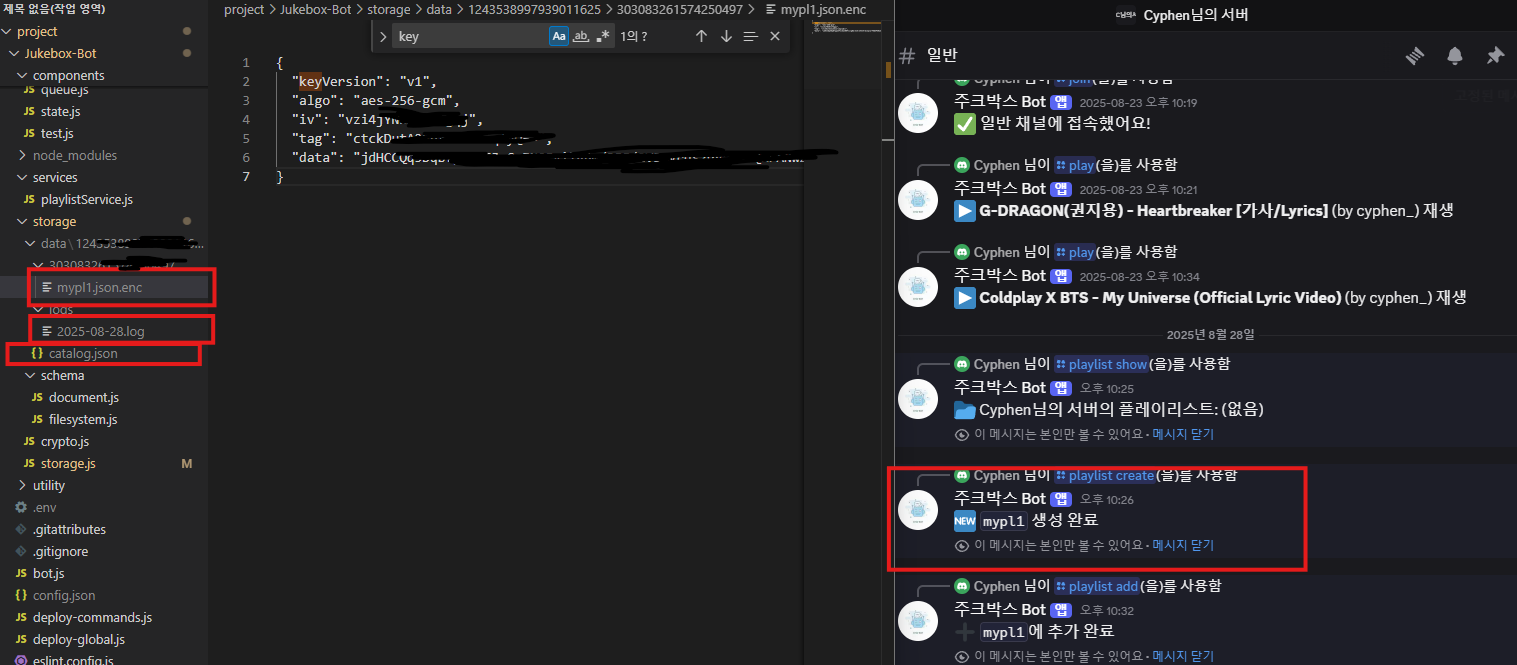
최종적으로 다음과 같이 파일 세 개가 생성된다.
봇 오토 로그아웃 지원하기
디스코드봇은 여러 서버에 존재할 수 있다.
만약 이걸 제어하지 않는다면 클라우드 서버를 오픈했을 때 쓸데없는 자원낭비가 심해질 것이기 때문에
타이머를 두어 봇이 자동으로 로그아웃 할 수 있도록 기능을 수정하였다.
bot.js
const fs = require('node:fs');
const path = require('node:path');
const { Client, Collection, Events, GatewayIntentBits, MessageFlags } = require('discord.js');
const { token } = require("./config.json");
const client = new Client({ intents: [GatewayIntentBits.Guilds
	, GatewayIntentBits.GuildVoiceStates]});

const { getVoiceConnection } = require('@discordjs/voice');
const Jukebox = require('./jukebox');

client.commands = new Collection();

const foldersPath = path.join(__dirname, 'commands');
const commandFolders = fs.readdirSync(foldersPath);

for (const folder of commandFolders)
    {
	const commandsPath = path.join(foldersPath, folder);
	const commandFiles = fs.readdirSync(commandsPath).filter(file => file.endsWith('.js'));
	for (const file of commandFiles)
    {
		const filePath = path.join(commandsPath, file);
		const command = require(filePath);
		// Set a new item in the Collection with the key as the command name and the value as the exported module
		if ('data' in command && 'execute' in command)
        {
            client.commands.set(command.data.name, command);
		}
        else
        {
			console.log(`[WARNING] The command at ${filePath} is missing a required "data" or "execute" property.`);
		}
	}
}

// 이벤트 등록
client.once(Events.ClientReady, readyClient => {
  console.log(`✅ Ready! Logged in as ${readyClient.user.tag}`);
});

// 로그인 실행
client.login(token);

// 봇 자동 종료
const AUTO_LEAVE_MS = 5 * 60_000;	 // 5분 유예
const _leaveTimers = new Map();		 // key: `${gid}:${cid}` → Timeout
function _key(gid, cid)
{
  return `${gid}:${cid}`;
}

function _countHumans(channel)
{
  if (!channel)
  {
    return 0;
  }
  return channel.members.filter(m => !m.user.bot).size;
}

function scheduleAutoLeave(guild, channel)
{
  if (!guild || !channel)
  {
    return;
  }

  const gid = guild.id;
  const cid = channel.id;
  const k = _key(gid, cid);

  if (_leaveTimers.has(k))
  {
    return;
  }

  const t = setTimeout(() =>
  {
    _leaveTimers.delete(k);

    try
    {
      const conn = getVoiceConnection(gid);
      if (!conn)
      {
        return;
      }

      const ch = guild.channels.cache.get(cid);
      if (_countHumans(ch) > 0)
      {
        return; // 복귀함
      }

      try { Jukebox.stop(gid); } catch (_) {}
      try { Jukebox.clear(gid); } catch (_) {}
      conn.destroy();
    }
    catch (e)
    {
      console.error('[auto-leave]', e);
    }
  }, AUTO_LEAVE_MS);

  _leaveTimers.set(k, t);
}

function cancelAutoLeave(guild, channel)
{
  if (!guild || !channel)
  {
    return;
  }

  const k = _key(guild.id, channel.id);
  const t = _leaveTimers.get(k);

  if (t)
  {
    clearTimeout(t);
    _leaveTimers.delete(k);
  }
}

client.on(Events.VoiceStateUpdate, (oldState, newState) =>
{
  try
  {
    const guild = newState.guild;
    const conn = getVoiceConnection(guild.id);

    if (!conn)
    {
      return; // 이 길드에서 연결/재생 중 아님
    }

    const channel = guild.channels.cache.get(conn.joinConfig.channelId);
    if (!channel)
    {
      return;
    }

    if (_countHumans(channel) === 0)
    {
      scheduleAutoLeave(guild, channel);
    }
    else
    {
      cancelAutoLeave(guild, channel);
    }
  }
  catch (e)
  {
    console.error('[voiceStateUpdate]', e);
  }
});

client.on(Events.InteractionCreate, async interaction => {
    if (!interaction.isChatInputCommand())
    {
        return;
    }
	const command = interaction.client.commands.get(interaction.commandName);

	if (!command)
    {
		console.error(`No command matching ${interaction.commandName} was found.`);
		return;
	}

	try
    {
		await command.execute(interaction);
	}
    catch (error)
     {
		console.error(error);
		if (interaction.replied || interaction.deferred)
        {
			await interaction.followUp({ content: 'There was an error while executing this command!', flags: MessageFlags.Ephemeral });
		}
        else
        {
			await interaction.reply({ content: 'There was an error while executing this command!', flags: MessageFlags.Ephemeral });
		}
	}
});

module.exports = client;
그리고 까먹고 작성하지 않았던 플레이리스트를 큐에 추가하기 기능을 주크박스에서 처리하도록 한다.
jukebox.js
Command에서 다음 함수를 호출하도록 해주자
const Queue = require('./components/queue');
const Player = require('./components/player');
const State = require('./components/state');
const { resolveVideo } = require('./components/youtube/youtube');

async function add(gid, input, requestedBy)
{
    const meta = await resolveVideo(input);

    Queue.push(gid, {
        url: meta.url,
        title: meta.title,
        videoId: meta.videoId,
        requestedBy
    });

    return meta;
}
function normalizeMeta(t)
{
    const url = typeof t.url === 'string' ? t.url : '';
    const title = typeof t.title === 'string' ? t.title : '';
    const videoId = typeof t.videoId === 'string' ? t.videoId : '';
    if (!title && !videoId && !url)
    {
        throw new Error('invalid track meta');
    }
    return { url, title, videoId };
}

async function addPlaylist(payload, opts = {})
{
    const guildId = String(payload?.guildId ?? '');
    const tracks  = Array.isArray(payload?.tracks) ? payload.tracks : [];
    const requestedBy = opts?.requestedBy ?? 'unknown';

    if (!guildId)
    {
        return { ok: false, code: 'INVALID_GUILD', added: 0, failed: 0, preview: [] };
    }
    if (!tracks.length)
    {
        return { ok: false, code: 'EMPTY', added: 0, failed: 0, preview: [] };
    }
    let added = 0, failed = 0;
    for (const t of tracks)
    {
        try
        {
            const meta = normalizeMeta(t);
            Queue.push(guildId, { ...meta, requestedBy });
            added++;
        }
        catch (e)
        {
            console.error('[jukebox.addPlaylist] push failed:', e);
            failed++;
        }
    }

    return {
        ok: true,
        code: 'BULK_ENQUEUED',
        added,
        failed,
        preview: tracks.slice(0, 3).map(x => x.title),
    };
}

async function play(gid, input = null, requestedBy = null)
{
    if (input === null) {
        const track = await Player.playNext(gid);

        return track
            ? { ok: true, code: 'PLAY_FROM_QUEUE', meta: track }
            : { ok: false, code: 'QUEUE_EMPTY' };
    }

    const meta = await resolveVideo(input);

    // 큐에서 같은 videoId 있으면 꺼내기
    const existingIndex = Queue.snapshot(gid)
        .findIndex(t => t.videoId === meta.videoId);

    if (existingIndex >= 0)
    {
        const track = Queue.remove(gid, existingIndex);
        Queue.get(gid).unshift(track);
    }
    else
    {
        Queue.get(gid).unshift({
            url: meta.url,
            title: meta.title,
            videoId: meta.videoId,
            requestedBy
        });
    }

    console.log("before skip:", Queue.snapshot(gid));
    const track = await Player.skip(gid);
    console.log("after skip:", track);

    return { ok: true, code: 'PLAY_BY_INPUT', meta: track };
}

function pause(gid)
{
    Player.pause(gid);
}

function resume(gid)
{
    Player.resume(gid);
}

function skip(gid)
{
    Player.skip(gid);
}

function stop(gid)
{
    Player.stop(gid);
}

function queue(gid)
{
    return Queue.snapshot(gid);
}

function clear(gid)
{
    Queue.clear(gid);
}

function remove(gid, index)
{
    return Queue.remove(gid, index);
}

function shuffle(gid)
{
    return Queue.shuffle(gid);
}

function status(gid)
{
    return State.snapshot(gid);
}

module.exports = {
    add,
    addPlaylist,
    play,
    pause,
    resume,
    skip,
    stop,
    queue,
    clear,
    remove,
    shuffle,
    status
};
결국 오늘 마무리 못햇다.
내일 서버에 올리고 포트폴리오화 해보도록하겟다..
프로젝트 코드는 다음 레포지토리를 통해 제공됩니다.
cyphen156/JukeBox-Bot: ToyProject : Discord JukeBox-Bot
GitHub - cyphen156/JukeBox-Bot: ToyProject : Discord JukeBox-Bot
ToyProject : Discord JukeBox-Bot. Contribute to cyphen156/JukeBox-Bot development by creating an account on GitHub.
github.com
※ 추가 설명 내용
보안사항을 고려할 때 충돌나는 부분이 플레이리스트 조회와 접근 수정시의 인증과 관련된 부분이었다.
show 명령어는 카탈로그를 통해 플레이리스트가 뭐가 있는지를 조회하기 때문에 유저 플레이리스트를 복호화 할 필요가 없엇다.
하지만 플레이리스트 안에 있는 트랙 리스트를 보고, 큐에 추가하기 위해서는 필연적으로 다른사람의 암호화 파일을 복호화 하여 정보를 열람해야 한다.
이 부분에 대해서 접근 권한과 인증에 대해 고려한 결과 다음과 같은 결론이 도출되었다.
1. 플레이리스트에 수정을 가하는 조작이 발생할 때
커맨드를 호출 할 때 디스코드 서버 측으로부터 API를 통해 명령어를 호출한 UserId를 받아온다.
이 UserId를 사용하여 플레이리스트 파일을 복호화 한다.
2. 반대로 플레이리스트를 조회하고 큐에 추가할 때
카탈로그에 있는 길드별로 저장된 플레이리스트 목록에 접근할 때 사용되는 UserID 값을 사용하여 플레이리스트 파일을 복호화한다.
이 둘은 같은 UID를 사용하지만 전달받는 경로가 다르다.
1번의 경우 디스코드 서버에서 전달받고 있기 때문에 해커가 타인의 UID로 자신의 UID를 디스코드에게 조작하여 명령어를 전달하거나 JukeBox-Bot 애플리케이션이 실행되고 있는 서버 컴퓨터에 조작된 토큰을 전송하지 않는 이상 패킷 변조가 불가능하다.
만약 이 경우가 발생했다면
1. 내 서버 컴퓨터가 물리적으로 해킹당했거나,
2. 디스코드 서버가 해킹당한 경우이다.
둘 모두 이미 해킹당한 상태이기 때문에
봇 서버 컴퓨터 내부에 저장된 .env 파일 또한 해커가 조회할 수 있다는 소리이며,
암호화 / 복호화 로직 모두 공개된 상태를 의미한다.
그렇기 때문에
2번의 경우 내부적으로 저장된 UID를 사용하여 플레이리스트를 복호화 한 후,
이 복호화된 데이터를 사용자에게 전송하는 것이
보안의 문제를 일으키지 않는다는 결론을 내렸다.(사용자에게 전송되는 메세지는 평문 메세지이기 때문이다.)
'토이프로젝트 > 디스코드 주크박스 봇' 카테고리의 다른 글
| 디스코드 봇 - 주크박스 봇 만들기 #7 봇 클라우드 서버에 올리기 With Azure VM / 애플리케이션 systemd서비스하기 (2) | 2025.08.31 |
|---|---|
| 디스코드 봇 - 주크박스 봇 만들기 #5 복호화 → 암호화 재생 → 스트림 안정화 (6) | 2025.08.22 |
| 디스코드 봇 - 주크박스 만들기 #4 유튜브 연동하기 (3) | 2025.08.21 |
| 디스코드 봇 - 주크박스 만들기 #3 명령어 배포하기 (1) | 2025.08.19 |
| 디스코드 봇 - 주크박스 만들기 #2 봇 활성화 및 코드 적용하기 (8) | 2025.08.18 |


